Klobber / Linux
Hugo rendering test: diagrams, images and technical markup
A permanent visual test page for Mermaid diagrams, nwdiag, images, tables, code and article callouts.
This is a permanent rendering fixture rather than a normal editorial article. It exercises the Markdown, Hugo and theme-dependent components likely to appear in future K’loger posts.
Mermaid flowchart
flowchart LR
  Router["Internet router"] --> Firewall["edge-01"]
  Firewall --> Switch["core-01"]
  Switch --> Proxmox["proxmox-01"]
  Switch --> Console["console-pi"]
  Proxmox -->|VM traffic| HomeAssistant["Home Assistant"]
  Proxmox -->|ISO storage| NAS["nas-01"]
Figure 1: A simple home-lab flowchart. Switch between Light and Orange to rerender the diagram with the active palette.
Mermaid sequence diagram
sequenceDiagram
  actor User
  participant Browser
  participant Hugo
  participant CloudFront
  participant S3
  User->>Browser: Open article
  Browser->>CloudFront: GET /posts/example/
  CloudFront->>S3: Fetch cache miss
  S3-->>CloudFront: Static HTML and assets
  CloudFront-->>Browser: Cached response
  Browser-->>User: Render K’loger
Mermaid state diagram
stateDiagram-v2
  [*] --> Draft
  Draft --> Review: hugo build
  Review --> Draft: fix notes
  Review --> Published: merge and deploy
  Published --> Monitoring
  Monitoring --> Rollback: health check fails
  Rollback --> Review
  Monitoring --> [*]
Mermaid timeline
timeline
  title Home-lab deployment
  section Morning
    08:00 : Backup configuration
    08:30 : Check console access
    09:30 : Apply network change
    10:00 : Validate routes
  section Afternoon
    11:15 : Test rollback
    14:00 : Record outcome
Mermaid class-style model
classDiagram
  class Host {
    +String hostname
    +String address
    +health()
  }
  class Hypervisor {
    +String cluster
    +startVm()
  }
  class Service {
    +String name
    +String port
    +check()
  }
  Host <|-- Hypervisor
  Host "1" --> "many" Service : runs
nwdiag network diagram
The following diagram is generated from home-lab-network.diag by nwdiag. The .diag source remains next to the rendered SVG so it can be edited and regenerated.
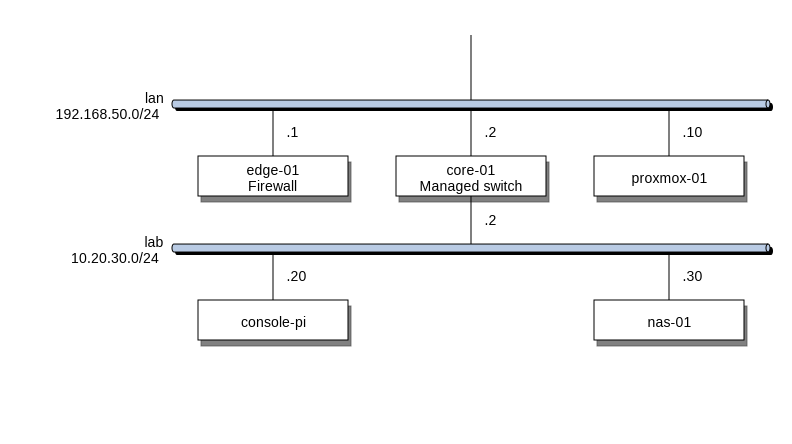
nwdiag {
  network lan {
    address = "192.168.50.0/24";
    firewall [address = ".1"];
    switch [address = ".2"];
    proxmox [address = ".10"];
  }
  network lab {
    address = "10.20.30.0/24";
    switch;
    console [address = ".20"];
    nas [address = ".30"];
  }
}
Images and figures
 Figure 3: The site avatar. SVG keeps the small header version and full-sized uses sharp at any display density.
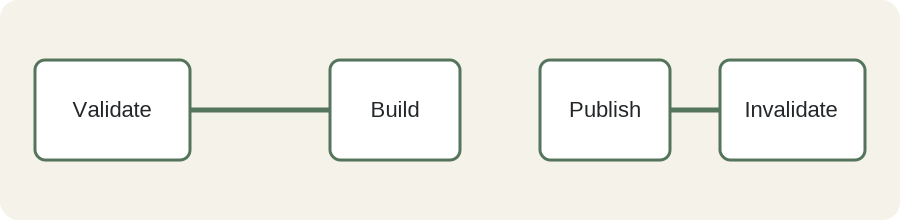 Figure 4: An existing static SVG used to check figure and caption layout.
Tables
| Component | Address | Purpose | Check |
|---|---|---|---|
| edge-01 | 192.168.50.1 | Firewall and routing | ping -c 1 192.168.50.1 |
| core-01 | 192.168.50.2 | Managed switch | SSH and LLDP |
| proxmox-01 | 192.168.50.10 | Virtualisation host | Web UI and console |
| console-pi | 10.20.30.20 | Serial access | systemctl status ser2net |
| nas-01 | 10.20.30.30 | Backups and ISO storage | Verify a recent restore |
A deliberately wide table follows to check horizontal scrolling on 320px screens.
| Host | Management address | VLAN | Operating system | Role | Backup target | Monitoring | Notes |
|---|---|---|---|---|---|---|---|
proxmox-01 | 192.168.50.10 | 50 | Proxmox VE | Hypervisor | nas-01 | Zabbix | Keep console access available |
console-pi | 10.20.30.20 | 30 | Raspberry Pi OS | Serial console | nas-01 | Zabbix | Stable USB IDs required |
Lists and notes
- Test an unordered list item.
- Keep terminal commands readable.
- Confirm images retain their aspect ratio.
- Build the site.
- Switch to Orange mode.
- Check that every Mermaid diagram changes palette.
- Resize the browser to 320 CSS pixels.
Code blocks
set -euo pipefail
hugo --panicOnWarning
hugo server --port 1313
curl -fsS http://localhost:1313/posts/hugo-rendering-test/
from pathlib import Path

post = Path("content/posts/hugo-rendering-test")
assert (post / "home-lab-network.diag").is_file()
assert (post / "home-lab-network.svg").is_file()
Inline markup
Use hugo --minify for production output. Links to the Hugo documentation should remain visible in either theme, while long commands such as ip -br address show dev enp3s0 should not wrap unexpectedly.
This test article is intentionally broad. It is not a replacement for browser inspection, but it keeps common failures visible during development.